
关闭截图音效(Command + Shift + 4)#
关闭#
1defaults write com.apple.screencapture disable-sound -bool true
2killall SystemUIServer恢复#
1defaults write com.apple.screencapture disable-sound -bool false关闭 Mac 插电或抬盖自动开机(Apple Silicon)#
适用于搭载 Apple 芯片且运行 macOS Sequoia 15 或更高版本的 Mac 笔记本电脑。详见 Apple 支持文档。
关闭#
1sudo nvram BootPreference=%00需要输入管理员密码以执行。
恢复#
1sudo nvram -d BootPreference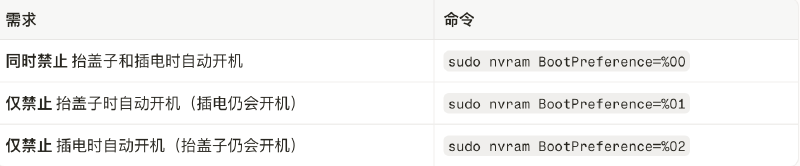
默认显示 Finder 隐藏文件#
显示#
1defaults write com.apple.finder AppleShowAllFiles -bool true
2killall Finder恢复#
想恢复默认隐藏,把 true 改为 false 后再执行一次即可。