

Review per-turn, session-wide, and Git changes in a fullscreen TUI inside pi. Browse changed files on the left and inspect diffs on the right, with mouse support, automatic line wrapping, and unified or split views.
Features#
- Review at different scopes: inspect the latest task, session total, or Git changes, with file counts and added/removed line totals.
- Keep your history: recorded task diffs remain available after reloading pi, resuming a session, or switching session branches.
- Use either language: switch between English and Simplified Chinese with
l/L; your choice is remembered. - Review safely: viewing diffs does not stage, commit, or revert files. Task and session views also work outside Git repositories.
Unified and split views#
Read changes in one column or compare old and new content side by side. Press v / V or click the view toggle to switch. Long lines wrap automatically, and colors follow your pi theme. Added/deleted files and narrow windows use unified view.
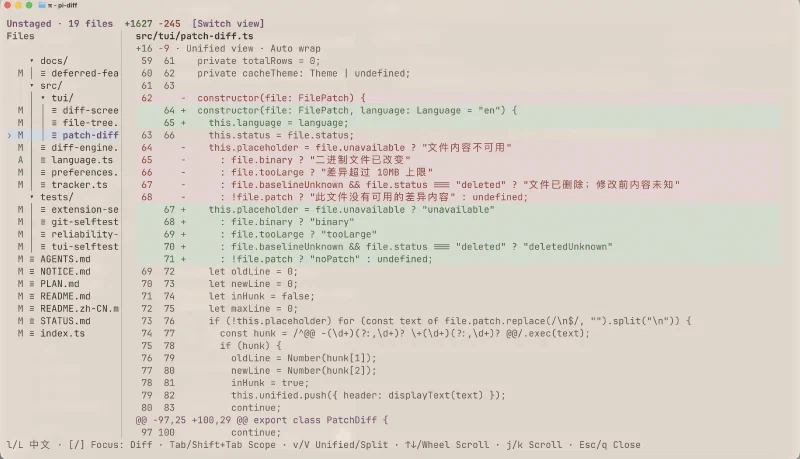
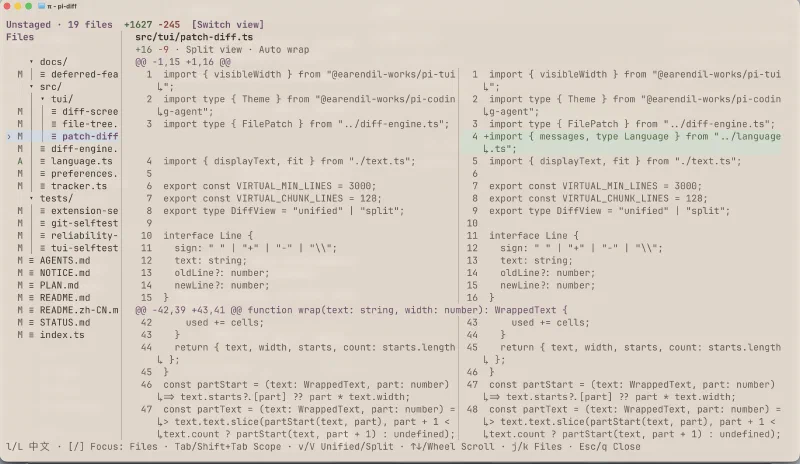
Click either image to view it at full size.
File tree and draggable divider#
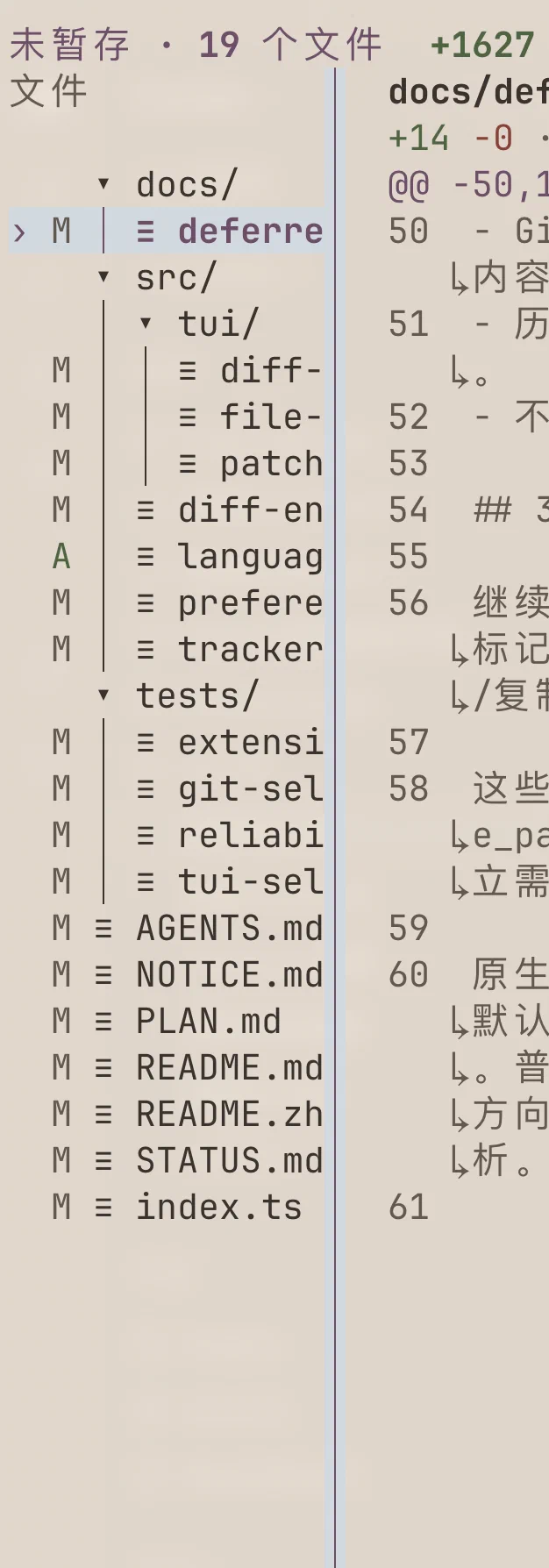
Find changed files in collapsible directories. A, M, and D indicate added, modified, and deleted files.
Drag the divider to give more space to the tree or diff; double-click to reset. Drag to the left edge to hide the tree, then press [ or click [Show files] to bring it back.
Inspired by opencode#
Inspired by opencode, pi-diff brings its terminal diff review experience into pi through /diff.
Installation#
Project development environment: pi 1.2.0 or later, Node.js ≥ 22.19.0, npm, and Git.
1# Install the extension
2pi install npm:@lyrumu/pi-diff
Alternatively, install from GitHub:
1# Install from GitHub
2pi install git:github.com/lyrumu/pi-diff
Restart pi after installation, or enter /reload in a running session.
To update or uninstall:
1# Update the extension
2pi update npm:@lyrumu/pi-diff
3
4# Uninstall the extension
5pi remove npm:@lyrumu/pi-diff
If you installed from GitHub, use git:github.com/lyrumu/pi-diff as the source in both commands instead.
Usage#
Start pi in your project directory and enter /diff. Git repositories open Unstaged by default; other projects open Last turn. To browse files, press [, select with j / k, then press ] to read and scroll the diff. The interface starts in English; press l / L for Simplified Chinese.
Press Tab / Shift+Tab to cycle forward or backward through the available scopes:
| Scope | Changes shown |
|---|---|
| Last turn | Changes from the most recent task |
| Session total | Cumulative changes recorded on the current session branch |
| Unstaged | Changes that have not been staged |
| Uncommitted | Staged and unstaged changes |
| All branch changes | Changes relative to the base branch, including committed and uncommitted work |
Git scopes also include untracked files. Outside a Git repository, only the first two scopes are available.
Keyboard and mouse#

The shortcut bar follows the current focus: j / k select files when the tree is focused and scroll when the diff is focused.
| Action | Keyboard / mouse |
|---|---|
| Select files and collapse directories | Click; use ↑↓ in the file tree and Enter / Space to expand or collapse directories |
| Next / previous file | j / k while the file tree is focused |
| Focus the file tree / diff | [ / ], or click the corresponding pane |
| Resize / hide the file tree | Drag the divider; drag to the left edge to hide; double-click to reset the width |
| Show the hidden file tree | [ or click [Show files] at the top |
| Scroll the diff | Mouse wheel, ↑↓, j / k, PageUp / PageDown; Home / End jump to the start / end |
| Switch unified / split view | v / V, or click the view toggle at the top |
| Switch English / Simplified Chinese | l / L |
| Close | Esc / q |
In narrow windows, [ / ] switch between the file tree and diff pages.
Data and limitations#
- Task and session history only covers changes recorded after enabling the extension, within the project directory. Git scopes can show existing changes.
- Outside Git repositories, shell changes may show
Previous contents unknown. If a complete session total cannot be restored, the viewer says so. - Binary files and diffs exceeding 10 MB show a notice instead of their contents.
License#
MIT. Parts of the implementation are ported from opencode. See NOTICE.md and third-party licenses for attribution and license terms.